

Transform qualification workflows with a smarter, digital approach
Managing learner qualifications often involves printing forms, tracking signatures and manually passing documents between trainers, managers and learners. These steps slow down the process and create gaps in documentation, making audits more difficult.
Advanced Qualification Form Workflows in our ULTRUS® ComplianceWire® software replace manual tasks with a structured digital experience that simplifies training, strengthens traceability and reduces time required for administrative effort tied to paper‑based processes.
Discover how our ULTRUS® ComplianceWire® software transforms a fragmented qualification process into a guided, automated workflow
Behind every qualification program is a maze of steps, signatures and stakeholders. This on‑demand demonstration shows how Advanced Qualification Form Workflows turn scattered, manual tasks into a clear, role‑based progression. Follow the process from setup to completion as the system routes actions automatically, adapts to different training scenarios and builds a traceable, audit‑ready record along the way.
Watch the on‑demand demo to see how to:
- Build a segmented form
- Assign signers and define signature order
- Configure sequencing and non-sequencing behavior
- Export training evidence for audits
- Experience workflows from the admin, trainer and learner perspectives
- See automated workflow movement between roles
- Review completion history and signer timelines
A workflow built for real‑world training
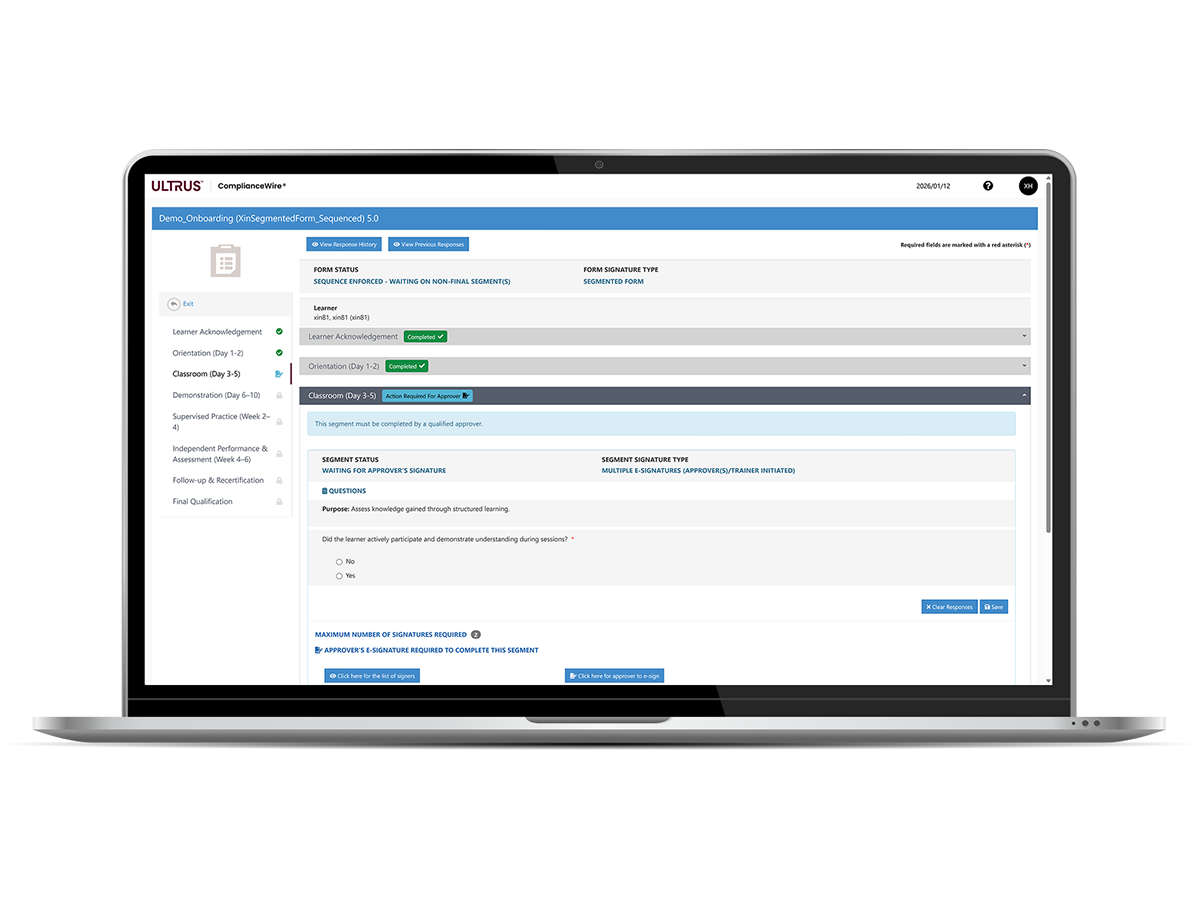
Advanced Qualification Form Workflows recognize that training and qualification rarely happen in one step. They unfold across stages — orientation, classroom learning, demonstrations, supervised practice and on‑the‑job assessments. Segmented forms reflect that reality by breaking a single qualification form into clear, purpose‑built steps that guide learners, trainers and approvers through each phase at the right time — without unnecessary handoffs or rework.
Watch the on-demand video on this page to learn how these segments create a streamlined, role‑based experience that replaces paper packets, reduces manual follow‑up and keeps every action traceable within a unified workflow.
What segmented forms make possible
Reduce administrative tasks
Handle questions, signatures and approvals digitally instead of routing paper forms. Smart rules automatically move learners in and out of training assignments based on responses, while monitored fields trigger targeted email notifications to the right audiences. This removes repeat data entry and the need to track progress manually.

Accommodate up to 100 signatures
Segmented forms support up to 10 segments with up to 10 signers each, allowing organizations to capture as many as 100 signatures in a single digital workflow. This gives teams the capacity to involve multiple trainers, managers and reviewers across complex, multi‑step qualification programs — all without relying on paper or separate documents.

Automate complex workflows
Create forms with multiple segments, each designed for a specific training step. Admins can assign who completes each segment and in what order. Tasks move automatically to the next signer when ready.

Support multi‑chapter learning paths
Qualification programs often require different skills assessed by different trainers. Segmented forms support up to 10 segments, each with its own set of signers and questions — ideal for multi‑step or multi‑topic programs.
More flexibility for trainers and learners

Enforce sequencing — or don’t
Organizations can decide whether segments must be completed in order or can be worked on in parallel.
- Sequenced forms lock later segments until earlier ones are complete.
- Unsequenced forms allow trainers and learners to complete different segments at the same time — highly useful for multi-trainer programs or workflows tied to different SOPs.
The demo highlights both states, including the lock icons and launch page indicators that show who needs to act next.

Role-specific input
Each segment can collect answers from the right role at the right time — something not possible with earlier single-segment forms.
For example:
- Trainers can assess qualification status.
- Learners can acknowledge understanding.
- Managers can provide final approval.
- Additional signers can be added for oversight or specialized review.

Designed for regulated environments
Powered by ULTRUS® ComplianceWire® software, Advanced Qualification Form Workflows operate within our U.S. Food and Drug Administration (FDA) 21 CFR Part 11 validated platform, giving regulated organizations a trusted foundation for secure records, digital signatures and compliant reporting.

Improved traceability and audit readiness
Advanced Learner Qualification Form Workflows give organizations a clear, complete view of every action taken during training.
The system automatically records:
- Who answered each question
- When they signed
- How qualification status changed over time
- Comments or clarifications entered by trainers
- Uploaded documents tied to the segment
- A clear timeline of all signatures
These records support regulatory expectations and can be exported as PDF, CSV or Excel for audits or internal reviews. Whether teams present information on screen or in print, they have reliable, organized evidence ready whenever it’s needed.

Advanced Qualification Form Workflows
1.2 MB
Related software
ComplianceWire®
Navigate FDA regulations, automate training and implement risk management to support the development of safer and more effective products.
X
Ready to transform your workflows?
Request a personalized demo to explore how ULTRUS® ComplianceWire® and Advanced Qualification Form Workflows can help your organization reduce administrative work, simplify qualification processes and strengthen compliance.
Please wait…
Characters remaining